
The digital world has become a battlefield for entrepreneurs, salespeople, and corporations when it comes to finding new leads. The main solution for this challenge is LinkedIn as a platform or channel, if you will, where people fish for new and fresh prospects daily.
If you have the urge to create a strong network filled with professional leads that belong to your niche, then you need to start using LinkedIn’s features wisely.
Search Tips for Qualified Leads
Since things are changing rapidly, cold-calling is not on the menu anymore. People want to be treated as they are, as humans, not just as objects that need to pay you money. The good thing here is that you can develop proper and honest relationships with your customers.
To become successful in this area, we offer you these 8 essential tips for gathering the right prospects.
LinkedIn Tip # 1. Always check the “People also viewed” feature
On every LinkedIn profile, there is a section named “People also viewed” that enables you to see which members of the platform have already viewed the same profile you are visiting at the moment. This feature gives you the chance to connect with like-minded professionals, given that you share similar interests or you are in a similar industry.
LinkedIn Tip # 2. Inspect your competitor’s network
While you are searching for new leads, checking out your competitors’ social media posts and content is inevitable. This way you can learn what type of content your potential customers like to receive and what their preferences are.
Also, while quietly observing your competition, you can learn how to do things better, so there is a great possibility that their leads will become part of your list. This competitor research can strengthen and improve your strategy for pursuing more qualified leads.
LinkedIn Tip # 3. Roll through the endorsement skills section
Examine the skills endorsement section on the profiles that you are visiting. This way you can see what connections these profiles have, and you’ll get a clue about what qualities your potential leads possess.

By endorsing skills, professionals recognize their unique abilities, which leads to greater and stronger collaboration.
Finding new prospects that tend to work in the same industry and nurturing those connections carefully can boost your list without a doubt.
LinkedIn Tip # 4. Use the Alumni application
This application tool can be used in two different ways, depending on your search goal.
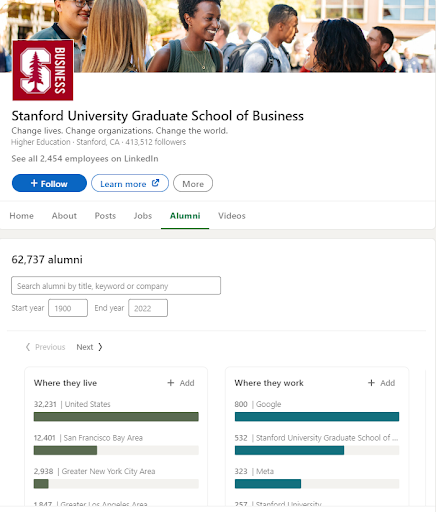
If you want to add your college or university classmates, you can use the Alumni tab and the LinkedIn alumni tool to find your graduates using keywords, their job titles, or the companies where they currently work. It’s easier and safer for people to connect with someone they have already met or with whom they attended the same school.
The other option this application offers is finding leads who went to different colleges. You can open the school’s page and enter the alumni who match your specific interest into the search query. Once you have gathered your prospects, you need to know how to export your contacts to complete your prospecting successfully.
LinkedIn Tip # 5. Post engagement
By post engagement, we mean that every time you get a notification that one of your leads has posted something, you should always use the opportunity to engage in a conversation about the topic, ask related questions, and give valuable answers when someone asks. This way you increase your visibility on the platform, and people will want to engage with you since you have been present and they feel as if they know you.
LinkedIn Tip # 6. The “Activity” Section will give you a blast
This section shows how people interact with your posts on LinkedIn. This way you can see which posts got the most impressions and likes through the analytics report, so this is how you will know what type of content your connections prefer. That’s another great approach to making real connections with your future leads and potential clients.
LinkedIn Tip # 7. Lead Recommendations and Boolean Search
The lead filter+ is a feature on your leads’ profiles that can give you up to 2,500 connections to choose from. You can also get a lead recommendation for a specific company that you can save or add to your list. Don’t forget to use the option from the Leads List tab, where you can check the recommended leads on your profile.
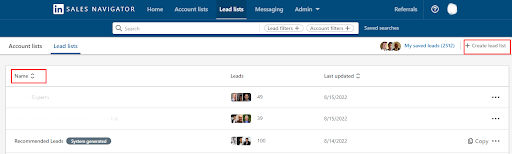
You can always refine your search by using Boolean modifiers that give you more specific search options. This search method is thoroughly explained on LinkedIn and is worth a quick check.
LinkedIn Tip # 8. Saving your most valuable searches
This is crucial if you want to stay on track and have the best leads on your list. You can do this by saving them, and you can also get a notification if there are any new prospects on the horizon.
Just click “Create search alert,” head to your saved preferences, press “Save,” and voilà, your precious searches are safe and sound.
Final Note: LinkedIn as a platform has many options and features that can improve your prospecting and increase collaborations. You just need to read and use them wisely.
Contact us to talk about how we can help you with the following: